
Geospatial · Software Implementation · Project Services · Cloud |
|
Eichcorp Insights 2026 Issue 4: From Strands to Structures |
|
Subscribe Fiber Services Connect GIS-Based Software for Fiber BroadbandEichcorp has been creating software for built infrastructure since day one… and it’s hard to believe, but in November 2026 we’ll hit 5 years as a business! Utility infrastructure — electric, fiber broadband, and others — brings unique challenges. Assets are networked and connected, and any digital system used to plan, construct, or operate a utility network needs rich, deep information. (That’s utility network in lower-case, on purpose. More on that later.) Fortunately for all of us, GIS is well-suited to utility asset management, fiber-optic systems included. Core capabilities of Esri ArcGIS include:
Eichcorp’s strength in utilities, and in fiber broadband specifically, is designing and building solutions that pair the core capabilities of Esri ArcGIS with custom-developed software for the specific needs of fiber workflows. |
|
|
Eichcorp’s Role as a Software Development PartnerEichcorp is mPower Innovations' software development partner for fiber broadband and electric utilities. mPower’s products were on display at the 2026 Esri Infrastructure Management & GIS Conference (IMGIS for short), held October 27–29 in Palm Springs, CA. It has been especially exciting to watch the growth of Fiber Pro, mPower’s product for fiber management. Fiber Pro builds on the power of Esri ArcGIS: the Esri geodatabase, ArcGIS Pro for editing and data maintenance, ArcGIS services for read/write access from integrated systems and field applications, and more. So, what’s new in Fiber Pro?Well, a few things come to mind:
|
|
|
Workflow Support for Fiber Broadband (and Other Infrastructure)Eichcorp helps organizations support a range of infrastructure workflows: operations and maintenance (O&M), as well as the design-build workflows common in new construction. We’ll focus on fiber here, but many of the same themes apply to electric utilities, septic/onsite wastewater, and other industries. Level 1: cables and devices on the mapFiber Pro is an example of a fiber management system, sometimes called FMS software. Network planners and fiber engineers use an FMS to manage an existing fiber-optic network. If you’re familiar with GIS, the first level of information in an FMS will look familiar: lines representing fiber cables, and points representing devices. At this level, the fiber network is a set of cables connected by devices. 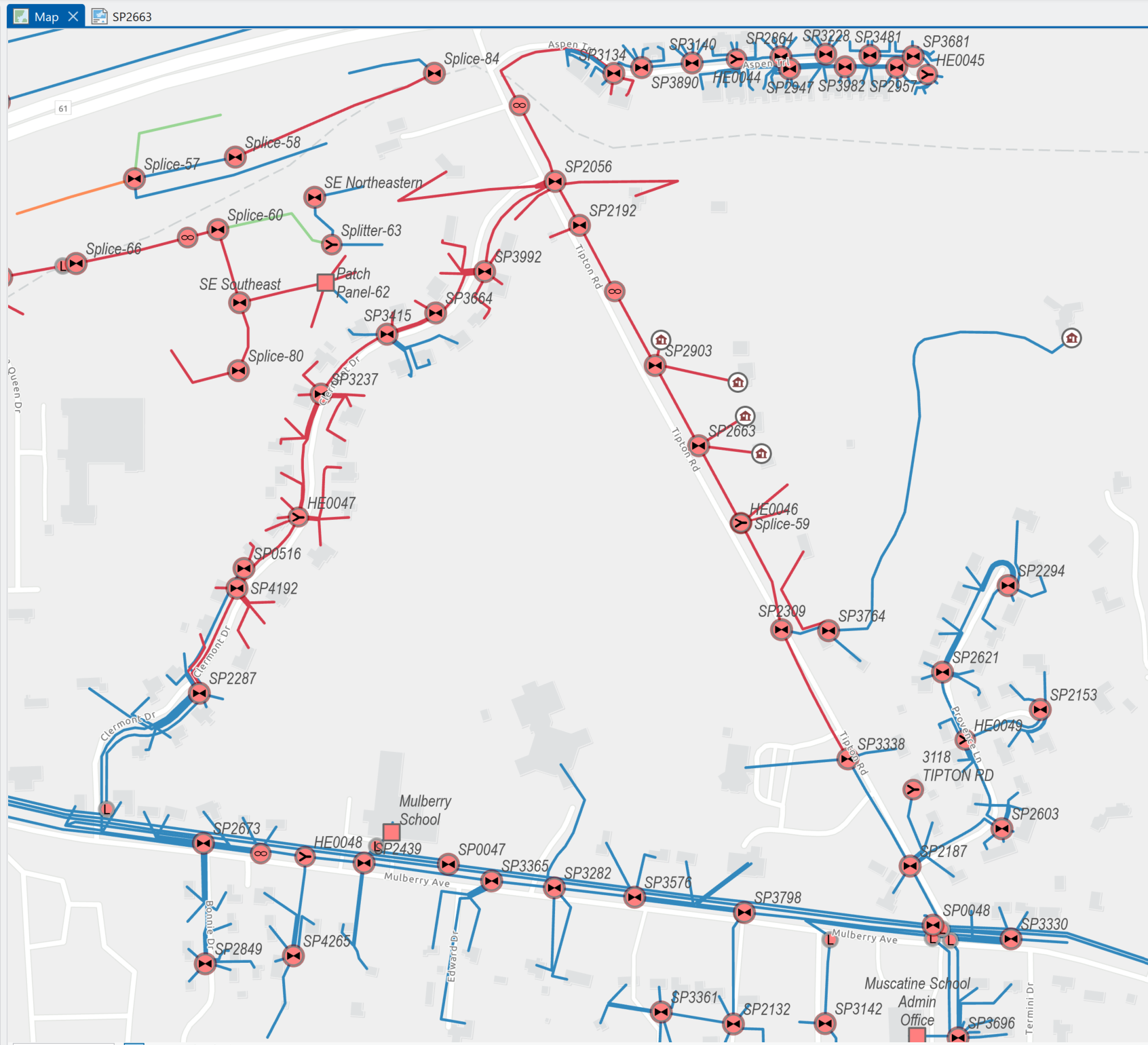
At the first level, a fiber network is cables connected by devices. Going deeper: tubes and strandsAn FMS goes deeper, though, letting the operator work with a cable’s internal components. Fiber-optic cables are typically organized as a set of buffer tubes. Each tube in turn contains multiple fiber strands: the individual glass filaments that carry light through the network. That light carries information between two points in the network… 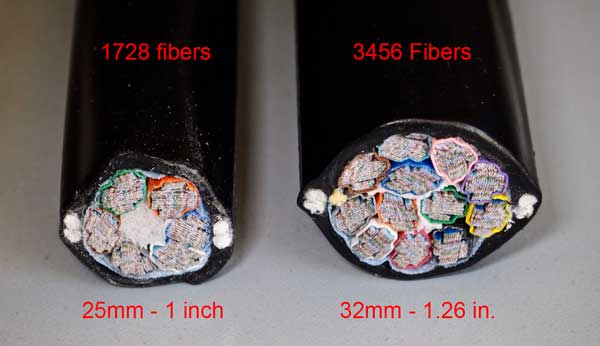
High fiber count cables (1,728 and 3,456 fibers), typical of a network backbone. Source: The Fiber Optic Association. … after all, why have a network in the first place if we can’t stream the latest episode of Slow Horses, or check whether our fantasy football team has a chance going into Monday night (with a little help from Peyton and Eli)? Just as important (maybe more so ; ) ), fiber-optic networks are used by state DOTs to operate signals, signage, and sensors. Some cities and towns manage their own FTTH (fiber-to-the-home) networks, and even those that don’t often maintain smaller networks connecting critical systems, including fire, emergency, police, and hospital facilities… Inside the devices… but back to the FMS, again using Fiber Pro as the example. Device information is also available one level deep, so the operator can see how many ports are in a given patch panel, or see the details of an advanced device such as a multiplexer/demultiplexer. These split and combine light by wavelength, letting multiple signals share the same fiber strand without any crosstalk. (More on that in my LinkedIn post on CWDM.) Connections: splicingWhat about connections? Possibly the most powerful feature of an FMS like Fiber Pro is the ability to view and update how individual fiber strands are connected together. This is called splicing. 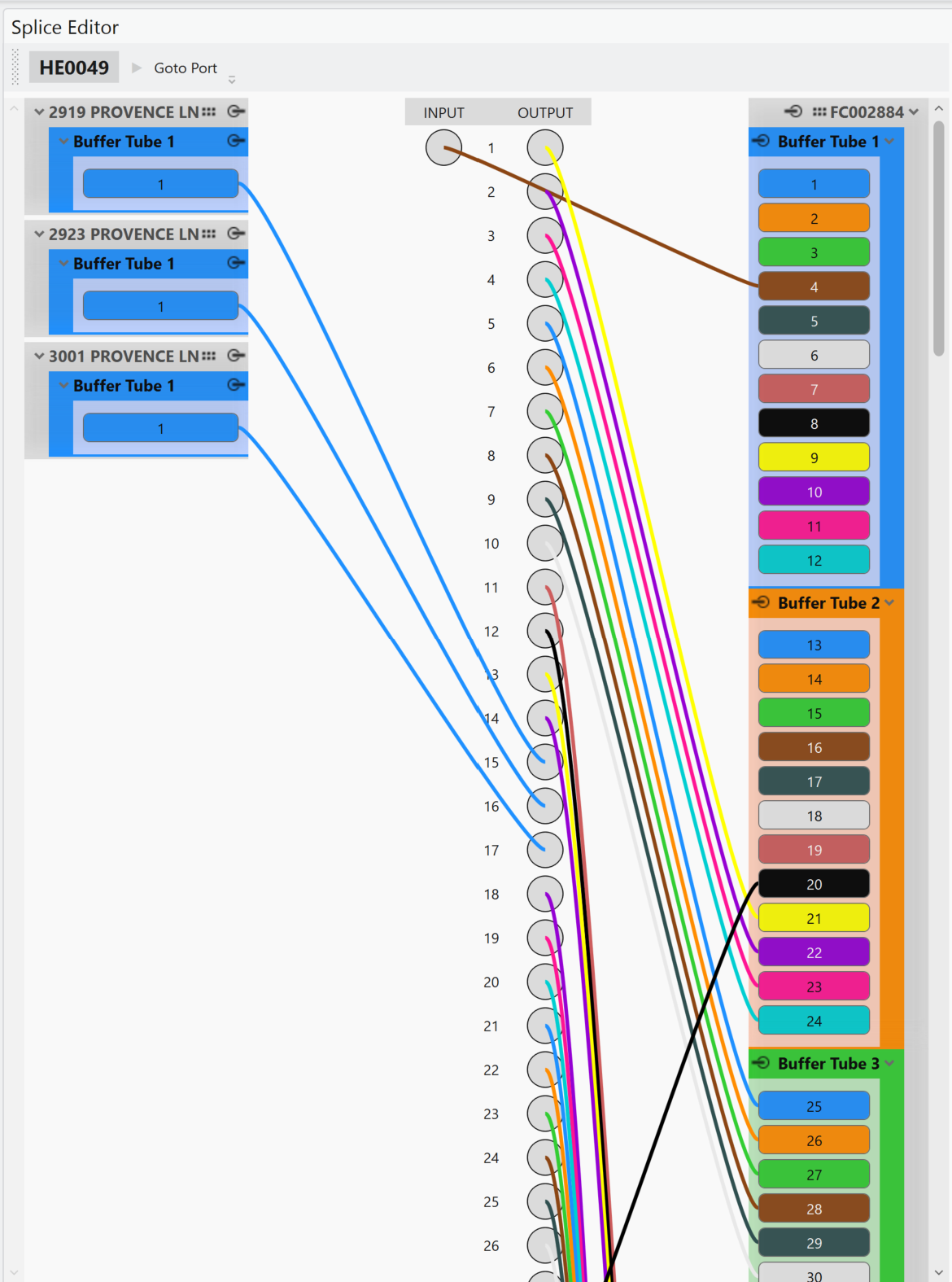
The Fiber Pro Splice Editor showing strands connected to patch panel ports. Putting it together: tracingIn O&M workflows, the network engineer uses an FMS to view their network on the map, and also to drill into sub-asset details. Splicing information defines how strands are connected end-to-end throughout the network. The engineer uses the FMS’s tracing capabilities to determine where and how a given port or strand is connected, including OTDR tracing, which helps field technicians pinpoint the exact location of an outage. 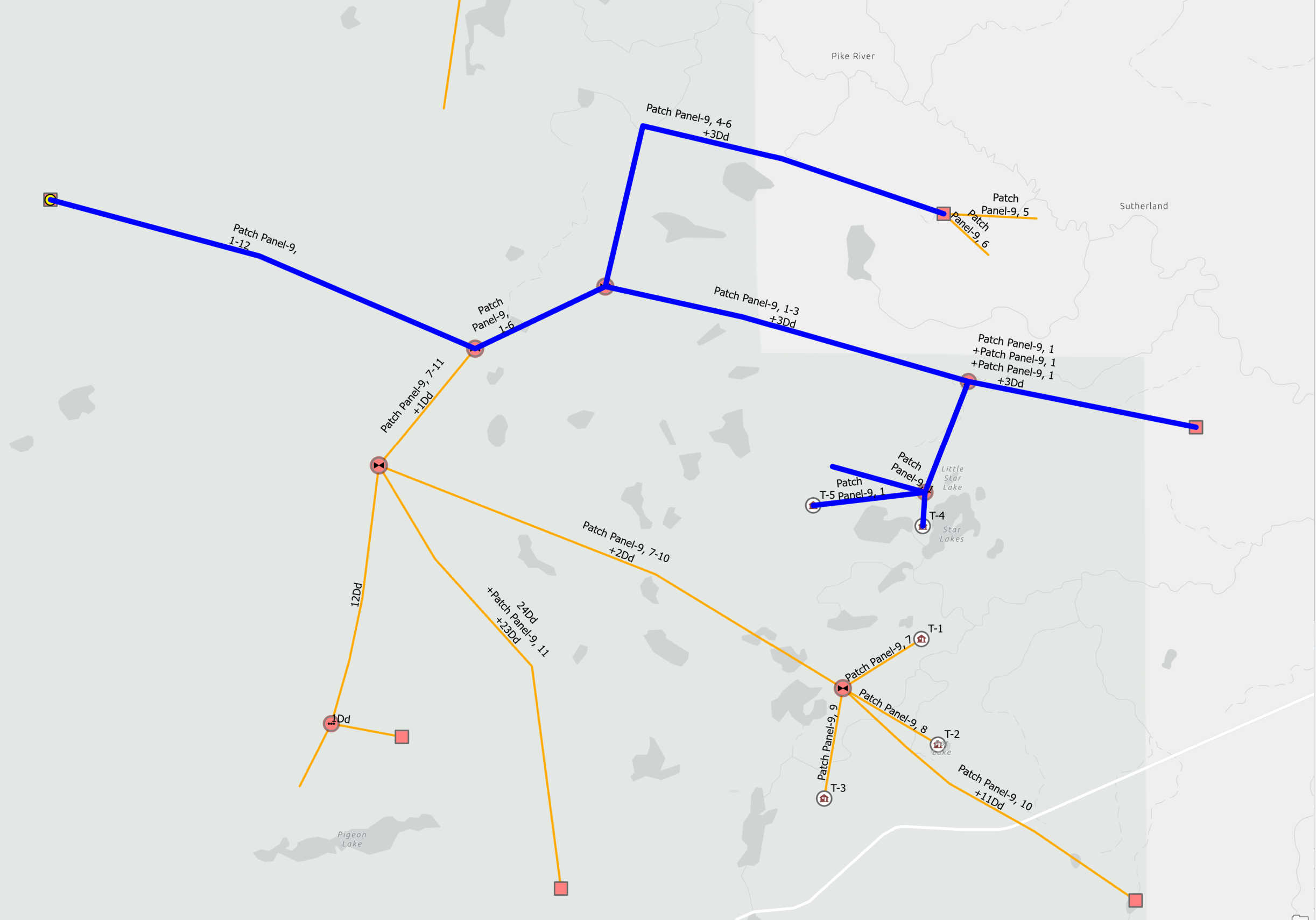
Port traces highlighted in blue across the network. |
|
|
Construction: Design-Build WorkflowsSo we’ve established how an FMS is used for O&M. But what about extending a network, or even building an entirely new network or “fiber-hood”? That’s where design-build workflows come in, and that’s where Fiber Pro conduits and structures come in. Both are new in the 2026 Fall Fiber Pro release. Put simply, step one of construction is design. GIS-based asset management systems are great for design because they’re the same tools used to create, maintain, and share utility networks (still lower-case) digitally. Off-the-shelf Esri ArcGIS plus a good data model go a long way toward supporting design-build workflows for fiber broadband. For many organizations, a product like Fiber Pro makes sense. The latest version supports structural assets in addition to “live fiber” assets (the ones light actually passes through). This release starts with underground structures: conduits, plus point structures such as cabinets, manholes, and handholes. 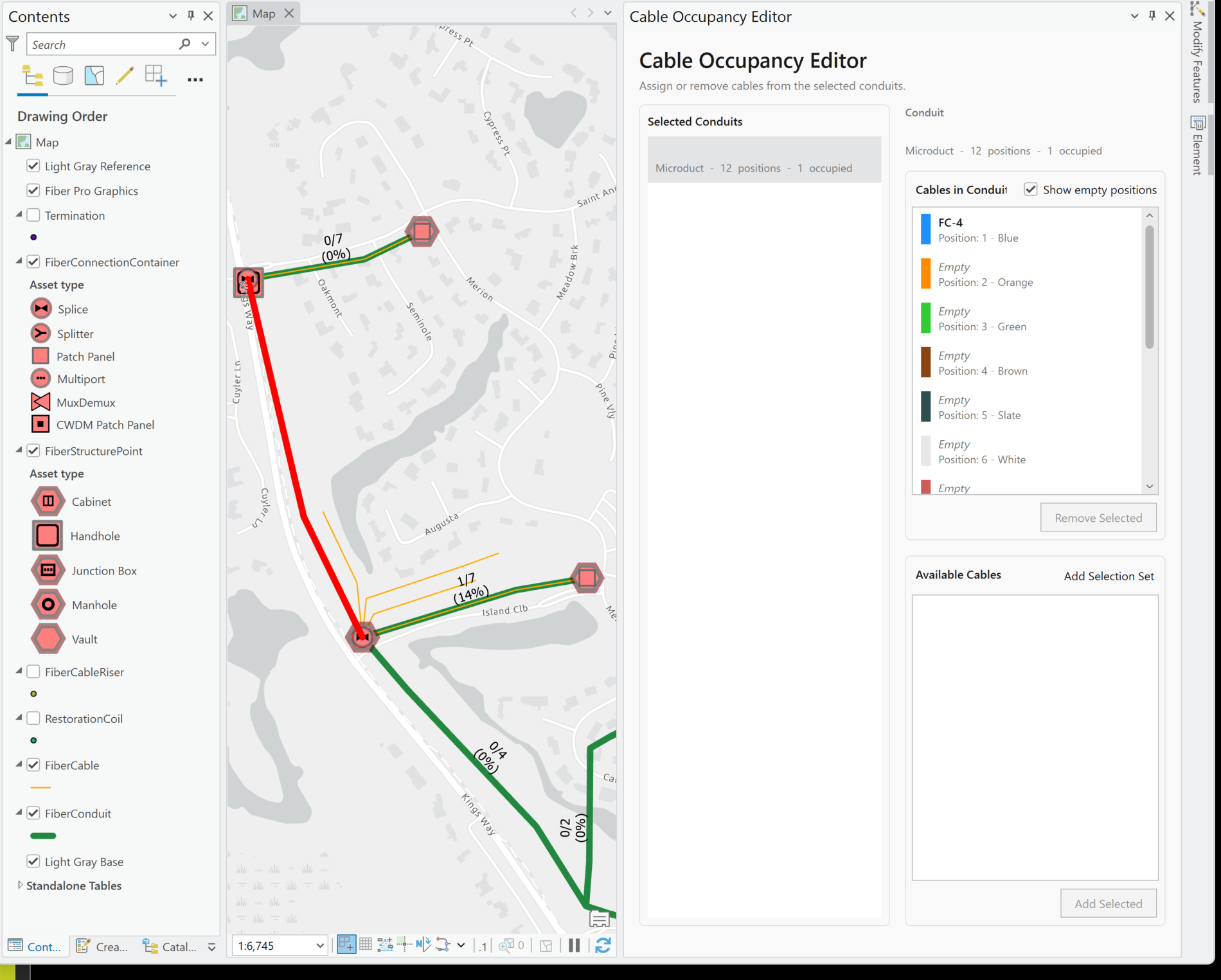
New in the 2026 Fall release: conduits and structures, with the Cable Occupancy Editor assigning cables to conduit positions. Why structures matter for design-buildHow do structural assets enable design-build workflows in an FMS? The structure is the “thing” being constructed. Installing an underground cable, for example, means digging a trench or boring from the side. Either way, the design plans center on the conduits, not the cables. The same goes for a cabinet: the cabinet is installed or mounted first, and then patch panels and other devices are installed inside it. Fiber Pro (like other FMS software) associates structural assets with non-structural assets. Fiber cables are associated with the conduits they run through, and fiber devices such as patch panels are associated with the cabinets they’re installed in. Fiber Pro uses the Esri geodatabase to model structures and implement these associations. Fiber Pro is not based on the Esri Utility Network (note the capitals: that’s Esri’s product), but there are interesting things happening there. Definitely stay tuned as we head into 2027 to see what Esri is doing in this space. Closing the loop: design, construct, operateStepping back for a broader view: however an FMS or design tool supports structures, an especially important question is how the digital data are passed to the people (and software) who construct the network. Fiber Pro has an especially strong pairing with Render Networks construction software. Whatever the tools, the cycle looks the same: designs are passed to the construction team, assets are built, the construction is documented (the so-called as-builts), and the as-builts are passed to the operator. When the operator uses Fiber Pro for O&M, the lifecycle comes full circle. In other cases the as-builts (again, digital GIS objects) are passed on to another operational system. Because we’re working digitally and based on GIS, we can translate GIS-to-GIS, GIS-to-CAD, or GIS-to-other to support the handoff. |
|
|
Wrap UpIt’s an exciting time for Fiber Pro. Conduits and structures, plus the pairing with Render Networks for construction, make a powerful combination for many design-build workflows. I’m looking forward to the feedback coming out of IMGIS 2026, from end-user organizations and also from Esri as they chart a course for expanded Utility Network (capitals here) support in fiber broadband. |
|
|
Upcoming EventsSee you there!NOV-01 thru NOV-03: VOWRA Annual Conference (Roanoke, VA) Virginia Onsite Wastewater Recycling Association. More info: vowra.org: Annual Conference. NOV-19 9:30AM: Charlottesville Professionals Breakfast Group (Guajiros Miami Eatery) The CPBG meets monthly in and around Charlottesville for breakfast and professional networking, and our meet-ups are open to everyone. More info: CPBG Fall 2026 Meet-Ups Planning AheadJUN-13 thru JUN-16 2027: FiberConnect (Nashville, TN) Registration opens November 9, 2026. More info: Fiber Broadband Association: FiberConnect Conference Thinking BigJUN-24 thru JUL-25 2027: FIFA Women’s World Cup (Brazil) Coming sooner than you think. More info: 2027 Women’s World Cup Key Details |
|
|
Where can I learn more?Subscribe to Eichcorp Insights if you haven’t already! See Eichcorp’s fiber broadband work and case study. Need a software development partner for GIS-based infrastructure software? Reach out to set up a conversation at: info@eichcorp.com. |
|
Eichcorp Inc. 513 E Main St, Charlottesville, VA 22902 |